


MSB Parent, USA
3.33.61K Reviews
App Specs
- Version
- 26.7.0.917
- Updated On
- License
- Free
- Downloads
- 1,000,000+
- Developer
- Global Payments Inc.
- Categories
- Education
- Platform
- Android
Screenshots



 Analysis by AppCompare
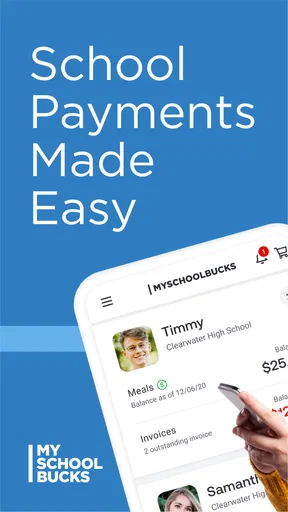
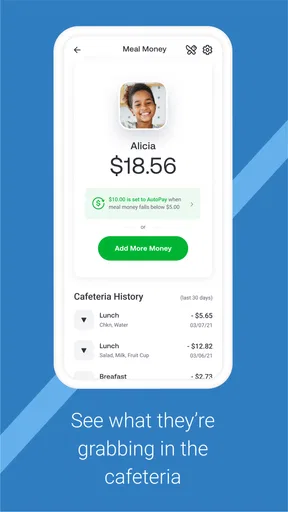
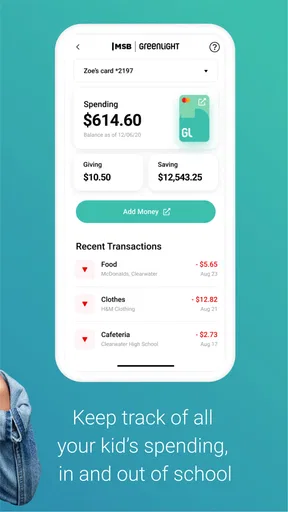
Paying for school meals is one of those small family tasks that becomes surprisingly stressful when it is left until the last minute. MSB Parent is an education app from Global Payments Inc. designed to put that responsibility on a phone instead of making parents rely on a school office, a paper reminder, or a desktop browser. I found its purpose easy to understand: it is mainly a practical payment companion for families using participating school meal services.
That focus is also the key to deciding whether it belongs on your phone. This is not a broad school-management suite, a learning platform, or a child-facing educational game. Its value depends on whether your child’s school uses the MySchoolBucks system and whether you want a mobile way to handle meal payments. The app is free, aimed at everyone, and listed in the Education category. It has been available since June 26, 2013, so it is a long-running tool rather than a newly launched experiment.
How MSB Parent feels in everyday use
I find the app easiest to assess as a focused payment tool, not as a window into every part of school life. In this section, I look at the moments when convenience helps and when a parent should slow down, then turn to the practical checks that make account handling feel more deliberate.
Speed expectations before you need to make a payment
My first impression is that this is the kind of app that should be judged by how quickly it gets out of the way. Parents usually open it with a specific goal: check whether an account needs attention, add money, or confirm that a payment task has been handled. The interface does not need to entertain you; it needs to make those steps understandable when you are standing in a school pickup line or remembering school expenses late in the evening.
In that role, the app’s narrow purpose is helpful. There are fewer reasons to browse around than in a full school portal, and that should make repeated visits feel more direct. I would not expect every screen to appear instantly in every situation, because payment-related actions often depend on account and service communication rather than only on the phone itself. A quick launch does not guarantee that a balance or transaction state will refresh just as quickly.
A useful habit is to open the app before the morning rush if you know you need to add funds. That gives you time to deal with a login prompt, a slow connection, or an account detail that needs checking. I would avoid treating it as a last-second emergency tool when your child is already heading through the school doors. The app is intended to make the process easier, but convenience works best when you leave a little room for the parts that happen beyond the device.
The current version is 26.7.0.917, and the app requires at least iOS 11. That minimum requirement is relatively approachable for people using an older compatible iPhone or iPad, although the age of a device can still affect how responsive any modern app feels. The operating-system requirement tells you whether installation is possible; it does not promise that an older phone will handle every screen with the same smoothness as a newer one.
Worth Reading Before You Choose

EA SPORTS FC Mobile 26 Is a Bigger Football Game, but It Takes Time

Flipboard Shows What News Apps Must Do Beyond the Feed

Switching to Android Auto Means Rethinking Your Driving Routine

Google Calendar Makes a Crowded Week Easier to Manage

Ludo King Makes the Most of the Minutes Between Plans

Baby Panda World Brings Quick Play to Modern Phones, but Its Game Library Feels Busy
What happens during heavier family-use moments
The busiest moments are not necessarily moments when the app itself is doing complicated work. They are the situations in which many parents may be checking meal accounts, preparing for a new school week, or trying to resolve a payment question at once. From a user’s perspective, this is when small delays feel much more serious because the task is tied to a child’s school day.
I would use the app for routine account maintenance rather than waiting until the balance situation is urgent. That is a practical distinction. A parent who checks occasionally can notice a problem while there is still time to use another route, such as contacting the school or returning to a browser. Someone who only opens it after a child reports trouble may find that the pressure comes from timing rather than from the app’s basic design.
Another realistic scenario is a split household. If more than one adult helps manage school expenses, it is worth agreeing on who checks the account and when. Otherwise, two people may assume the other has completed the payment, or both may repeat the same task. The app can be useful as a shared responsibility tool, but it cannot replace a simple family routine for confirming who handled what.
Families with several children should also approach the account carefully. Before confirming anything, I would slow down long enough to verify the selected student and the intended amount. That is not a criticism unique to this app; it is the normal trade-off of handling several school-related records from a small screen. Mobile convenience saves time, but it also makes a quick, distracted tap more likely than when you are sitting at a full-size computer.
For that reason, I see the strongest workflow as “check, verify, then act.” First look at the relevant account information, then confirm the child or school context, and only afterward complete the payment step. It takes a few extra seconds, yet it is more sensible than assuming the first visible account is the one you meant to use.
Reliability matters more than visual polish
With a payment app, reliability means more than opening successfully. I want the app to preserve a clear sense of what happened after I take an action. If a screen pauses, I would rather wait and check the resulting account state than immediately repeat the same action. That is one of the most important habits I would recommend to parents: when a transaction appears slow, do not rush into tapping the confirmation control again.
This is especially relevant on a weak mobile connection. A phone can lose contact at the exact moment an account action is being processed, leaving the user uncertain about whether to try again. In that situation, checking the account later or using the school’s established support route is safer than guessing. The app is a convenient access point, but it should not be treated as the only possible way to resolve an urgent payment question.
I also recommend keeping the app updated through the normal app-store process. Updates can matter for compatibility and stability, particularly when the phone’s operating system changes. At the same time, an update should not be assumed to solve every account issue. A login problem, school-account mismatch, or delayed account status may require attention beyond reinstalling the app.
The public reception is mixed rather than universally enthusiastic: MSB Parent has an average rating of 3.3 from around fourteen thousand ratings, with roughly three thousand six hundred written reviews. I read that as a reason to keep expectations practical. The app clearly serves a large audience, with over one million installs, but popularity does not mean every family will experience the same level of smoothness. Payment tools are judged harshly because even a small interruption can happen at an inconvenient time.
My own standard for reliability here is not whether every visit feels perfect. It is whether the app remains understandable when something takes longer than expected and whether I can recover without making the situation worse. A clear retry strategy, patience after a delayed action, and a backup route through the school are more valuable than simply seeing a fast opening screen.
Device constraints and the cost of keeping an older phone
The minimum iOS 11 requirement makes this a reasonable candidate for many older Apple devices, but the phone’s age still matters. Limited free storage, an older processor, or an operating system that has not been maintained for a long time can make launch and screen transitions feel less responsive. I would not blame the app for every pause, but I would consider the whole device when judging performance.
Resource demands are most relevant for parents who keep many apps open, have very little storage available, or use an older phone as a secondary family device. A simple education payment app should not be the reason to replace a phone, yet a cluttered or aging device can make any account workflow feel more troublesome. Closing unused apps, freeing a little storage, and keeping the operating system in a supported condition are sensible preparation before deciding that the app is unstable.
There is also a practical screen-size issue. A phone is convenient for a quick check, but a larger display can make several children, account details, or confirmation steps easier to review. If I were setting up a family account for the first time or sorting out an unusual issue, I would prefer a computer or tablet-sized screen when available. For a routine check while away from home, the phone is more convenient.
That comparison with the usual alternatives is important. A school website accessed through a browser may be better for a detailed review because it gives you more room and can fit into a parent’s existing desktop routine. Contacting the school office is better when the account information looks wrong or a payment needs human clarification. A paper reminder or email may tell you that action is needed, but the app is more useful when you want to handle the task immediately from a mobile device.
In other words, MSB Parent is not automatically superior to every alternative. It wins on portability and repeat access. A browser can win on visibility, while school staff can win on resolving exceptions. I would keep those alternatives in mind instead of forcing every problem through the app.
Who will benefit most from it?
The best match is a parent or guardian whose school already uses MySchoolBucks and who regularly manages meal-related expenses away from a desk. It is particularly practical for families with busy commutes, rotating schedules, or more than one adult involved in school routines. The free price removes one obvious barrier, and the Everyone content rating makes it suitable as a family utility rather than an age-restricted service.
I also think it suits parents who prefer a repeatable weekly routine. For example, I would choose one evening to check the account, review the selected student, and handle any needed payment before the school week becomes hectic. That turns the app from an emergency button into a small piece of household organization. The benefit is not just saving a few taps; it is reducing the chance that school meal administration becomes a morning crisis.
It is less suitable for someone whose school does not support the service, someone who rarely uses a smartphone for financial tasks, or someone who needs extensive school communication in the same place. This is not a replacement for a complete parent portal. If your main goal is attendance, grades, messages, assignments, or teacher communication, you will need the school’s other tools as well.
I would also hesitate to recommend relying on it alone if your phone connection is frequently unreliable or if you are uncomfortable reviewing payment details on a small screen. Those are not reasons to dismiss the app entirely, but they do make a browser or direct school contact a better companion. The right choice depends on whether mobile access solves a real problem in your household.
Small habits that make the experience safer and smoother
My first tip is to perform non-urgent tasks when you have a stable connection, not while moving between networks. This reduces the chance of being unsure whether a screen has finished loading. My second is to pause after any action that appears delayed. Repeating a tap is rarely the best recovery method when you do not yet know the result.
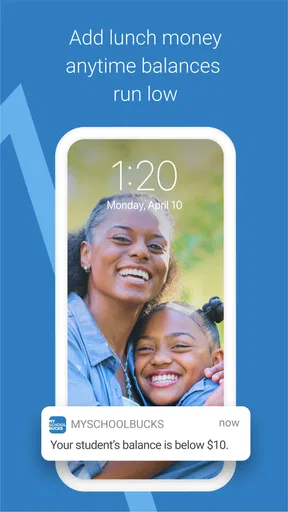
Third, I would make account review part of a calendar reminder rather than depending on a child’s message that funds are needed. That approach is especially useful when school schedules change or when several children use the same household budget. The app becomes more dependable when the parent’s process around it is dependable.
Fourth, keep a note of the normal support route for your school. If an account appears incorrect, a payment does not seem to settle, or the app behaves unexpectedly, knowing whom to contact prevents wasted time. The mobile app can handle ordinary access, but school-specific exceptions are often easier to explain to the people responsible for the account.
Finally, use a larger screen for careful setup or review whenever possible. The phone is excellent for quick maintenance, but convenience should not encourage rushed decisions. This is one of the app’s central trade-offs: it makes access easier, while the smaller display asks you to be more deliberate.
My performance verdict for busy parents
After looking at the app as a daily utility rather than a flashy product, I see MSB Parent as a focused and useful option for the families it serves. Its strongest quality is access: school meal administration can be handled from a phone instead of being tied to a computer or school-office visit. The free cost and broad device compatibility also make it easy to try when your school supports the system.
My reservations are about expectations and recovery. I would not depend on any mobile payment tool for a last-second emergency without checking the result carefully. Connection delays, older hardware, small-screen confirmation steps, and account-specific problems can all make a simple task feel more complicated. The mixed average rating reinforces that this is a practical tool, not one I would describe as flawless.
My recommendation is to use MSB Parent as a convenient first choice for routine meal-account checks, while keeping the school website or office as a backup. If your family needs quick mobile access and you are willing to verify details instead of rushing through them, it can remove a recurring bit of friction from the school week. If you want a complete education dashboard or need detailed help with unusual account issues, another channel will serve you better.
Overall, I would install it for a participating school, establish a regular checking habit, and judge it by whether it makes this one responsibility easier on your actual device. That is where the app earns its place: not through extra features, but through being available when a busy parent needs to take care of school meals without opening a laptop.
Pros
- Keeps parents informed about school updates
- events
- and important notices.
- Provides convenient access to messages from teachers and school administrators.
- Can help families track announcements without relying on paper communications.
- Useful for managing school-related information in one central mobile app.
- Supports quicker communication between schools and parents when enabled.
Cons
- Its usefulness depends on the school actively using and updating the platform.
- Some features may vary according to the school or district configuration.
- Frequent notifications can become distracting if alert settings are not adjusted.
- Parents may need separate accounts or access codes for different children.
- An internet connection is required to receive current information and messages.
FAQs for MSB Parent, USA
What is MSB Parent, USA used for?
MSB Parent, USA is a school communication and payment app designed to help parents and guardians manage important aspects of their child’s education from a mobile device. Depending on the school or district, it may provide access to announcements, messages, calendars, attendance information, grades, forms, activities, and school-related payments in one centralized place.
How do I sign in to MSB Parent, USA?
To use MSB Parent, USA, you generally need an account connected to your child’s school, district, or educational organization. Login details and account activation instructions are usually provided by the school. Some institutions may support email-based registration, while others use an existing parent portal account. If your credentials do not work, contact the school rather than creating multiple accounts.
What features are available in the app?
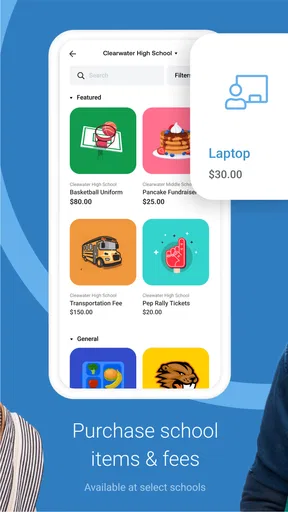
The features available in MSB Parent, USA can vary depending on how the school has configured the platform. Common tools include school announcements, direct communication with staff, event calendars, student information, attendance or academic updates, permission forms, and online payments for meals, trips, fees, or activities. Not every school will enable every feature.
Is MSB Parent, USA safe for managing student and payment information?
MSB Parent, USA is intended for use within participating educational organizations, so access to student information is normally tied to an authenticated parent or guardian account. Even so, users should protect their login credentials, avoid signing in on shared devices, and keep the app updated. Before making payments, verify the recipient, amount, and transaction details carefully.
Why can’t I see my child’s information or receive school notifications?
Missing student information or notifications may be caused by an incomplete account setup, an incorrect email address, outdated contact details, disabled phone permissions, or the school not having linked your account to the correct student profile. Check the app’s notification settings and confirm that you are using the official account provided by the school. If the problem continues, contact the school office or district administrator.


